MaxPower is a professional forex risk management tool designed for MT4 and MT5 traders. It helps traders control position size, enforce daily loss limits, manage drawdown, automate risk rules, and manage risk across multiple accounts, including copy trading setups and prop firm accounts such as FTMO and other funded trading programs.
95% of traders lose money not because of bad entries, but because of bad risk management. MaxPower automates the part of trading that humans consistently fail at — discipline, position sizing, drawdown protection, and copy trading risk control.
Blocks trading automatically once the daily loss limit is reached.
Position sizing, equity checks and auto-closing rules out of the box.
Get notified when thresholds are breached — email and in-app alerts.
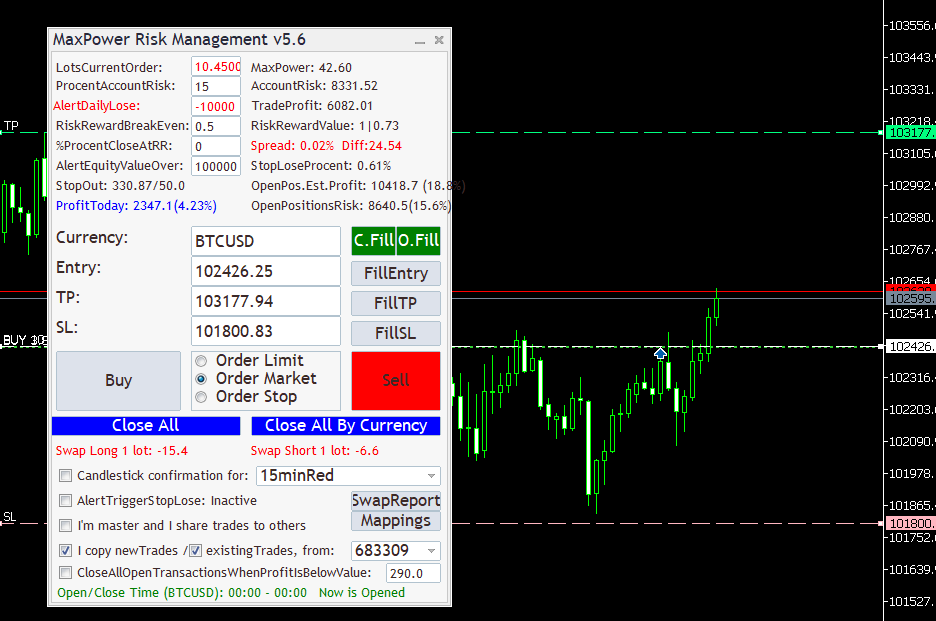
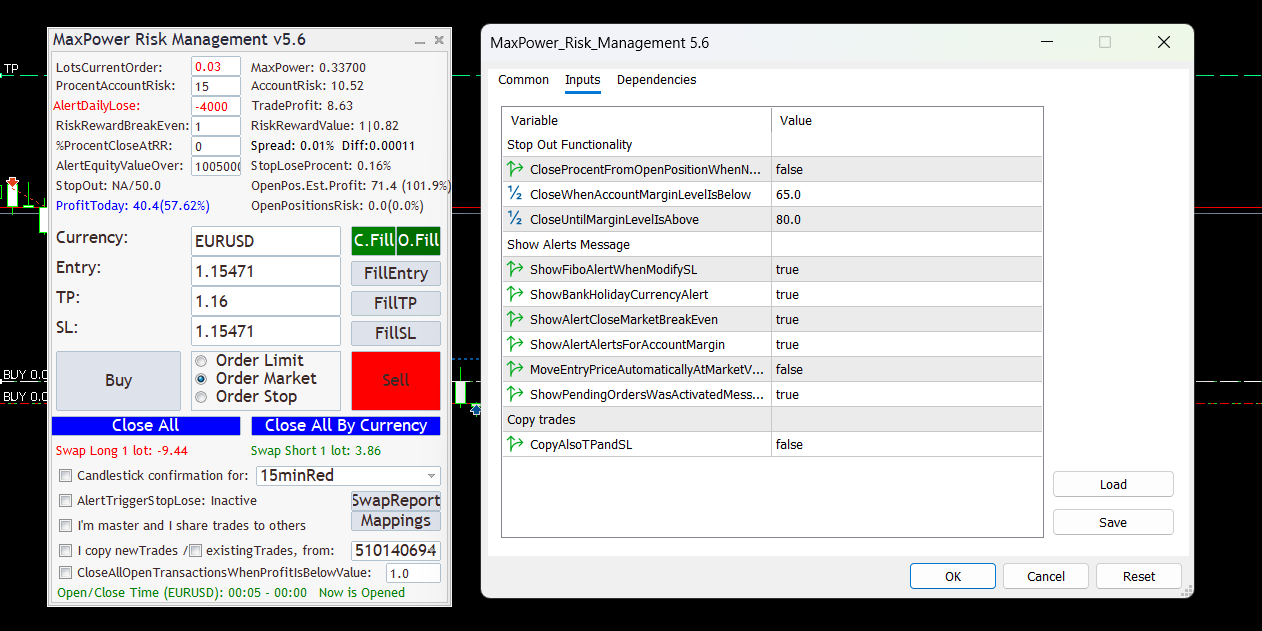
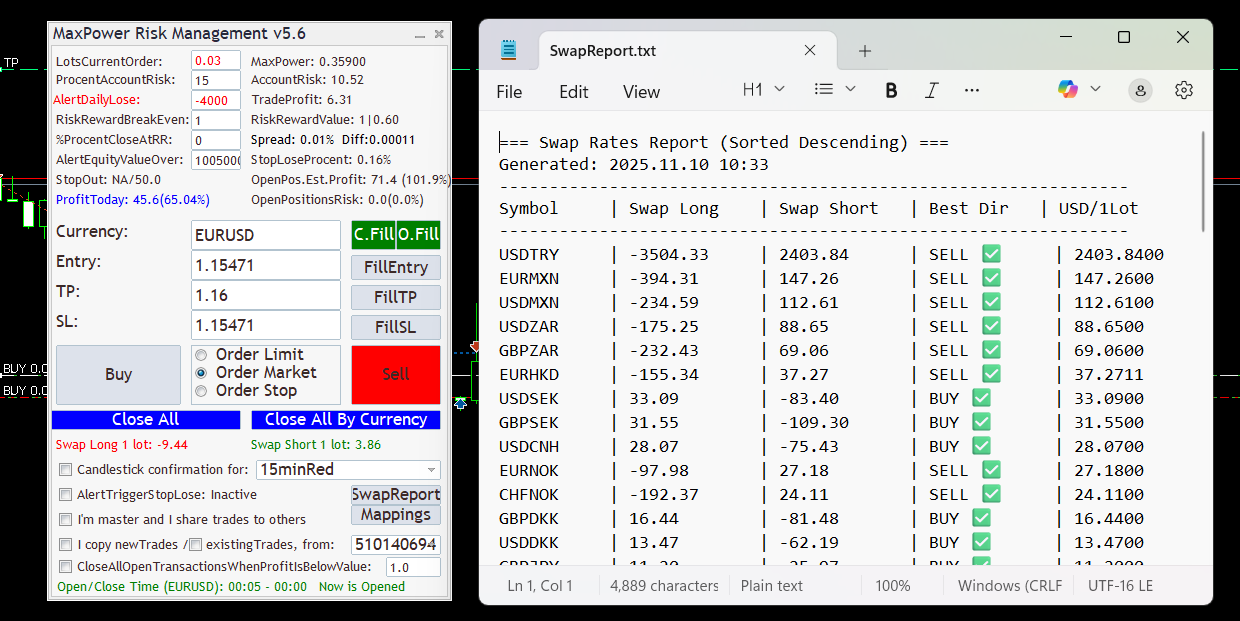
MaxPower combines forex risk management, prop firm account protection, and copy trading support in a single MT4 and MT5 workflow. It is built for traders who want disciplined execution, daily loss protection, and better control over multi-account trading environments.
Automatically calculates optimal position size based on your account balance, stop loss distance, and chosen risk percentage. Shows live risk per trade and potential loss in both % and monetary value.
Blocks all trading once the daily loss limit is reached. Visual and sound alerts prevent overtrading and help protect funded and personal accounts from avoidable breaches.
Tracks account equity in real time and stops all trades if your critical threshold is hit. Fully customizable alert values provide an extra layer of safety for disciplined traders.
Displays risk-reward ratio, breakeven point, and potential reward directly in the panel. Helps maintain consistent RR logic and cleaner trade execution.
Supports Market, Limit, and Stop orders. Smart buttons like “Fill Entry”, “Fill TP”, and “Fill SL” streamline order setup and reduce manual execution errors.
Close all open trades instantly or by currency pair via “Close All” and “Close All by Currency”. Shows live swap for long and short positions and improves total account exposure control.
Confirms entries based on customizable candle patterns such as 15minRed or 1HGreen. Filters premature entries and aligns execution with higher timeframe bias.
Copy trades across multiple accounts with advanced risk controls. MaxPower supports master/slave trade sharing, optional stop loss and take profit copying logic, and multi-account risk management for copy trading setups.
Control behavior with structured trading styles such as survival-focused execution and anti-overtrading logic. These modes help traders reduce impulsive decisions and protect capital over time.
Instant alerts when defined stop-loss, equity, or daily loss thresholds are hit. Especially useful for high-risk strategies, prop firm rules, and copy trading supervision.
Detailed performance reports, mappings, and trade history visibility help traders review execution quality, monitor account behavior, and optimize risk management settings.
MaxPower helps thousands of traders worldwide manage forex risk effectively. By enforcing daily drawdown limits, position sizing rules, copy trading risk controls, and prop firm risk policies, the platform protects trading capital across MT4 and MT5 accounts.
“I stopped overtrading — MaxPower literally saved my prop account!”
“The best risk manager EA I’ve used — and I’ve tested 15 others.”
“Automatic daily stops give me peace of mind — my performance improved.”
MaxPower is available only for MetaTrader 5 platforms. You can choose your preferred version during installation.
Absolutely. MaxPower helps prop firm traders maintain daily drawdown and equity rules automatically, ensuring compliance with firm restrictions.
The Pro plan allows activation on two MetaTrader accounts simultaneously. Additional activations can be purchased upon request.
Yes. MaxPower includes master/slave trade sharing and multi-account risk controls, making it suitable for copy trading workflows and supervised account replication.
Yes. We offer a 7-day free trial for new users. Create your account using the Login button and activate the trial from the Pricing section.
Download the EA, copy it into your MetaTrader Experts folder, attach it to your chart, and configure your risk parameters. A full installation guide and video tutorial are available upon login.
Yes. We provide customer support through our dedicated page Contact. Our support team responds to most requests within minutes.
MaxPower does not place trades on its own; it enforces your predefined risk rules and limits. It is designed to protect equity and reduce human error.
MaxPower automates risk and daily drawdown protection, which helps traders stay within firm rules. Results depend on your strategy and market conditions.
Here is a video tutorial with all steps to install the application in MetaTrader 5.
Not at the moment. The application works only on Windows. If you are using Linux or macOS, you will need access to a Windows computer to use MaxPower Risk Management.
Without proper risk management, most forex traders lose their accounts quickly. MaxPower helps traders enforce strict daily loss limits, control position sizing, and manage drawdown automatically across MT4 and MT5 trading accounts.
Full access — billed monthly
€29.99 /month
Login creates or links your account. Payments handled via Stripe.
Start Monthly PlanFull access — billed yearly
€299.99
Save over 16%
Secure payment via Stripe. One-time yearly billing.
Start Annual PlanDownload instantly. Get full access. If you’re not blown away — do nothing and pay nothing. It’s 100% risk-free.
START FREE TRIALStart here if you want a professional, survival-first framework. These core guides explain the rules, math, discipline, and execution models behind consistent forex risk control, prop firm compliance, copy trading supervision, and scalable trade management.
The full operating model: drawdown rules, session stops, risk limits, and how to structure your trading like a controlled system.
The real reasons accounts fail: sizing errors, overtrading, hidden correlation risk, and the behavioral traps that compound losses.
A defensive plan for CPI/NFP/FOMC conditions: spread expansion, slippage risk, and how to stay alive when volatility spikes.
Position sizing done right: risk-based lot calculations, stop distance logic, pip value validation, and consistent execution.
Understand daily and overall drawdown rules, equity resets, and how to structure risk to pass challenges without accidental breaches.
Learn how MT4 and MT5 copy trading works, including master-slave setup, trade copiers, lot scaling, execution drift, and risk control across multiple accounts.
This is a demo login — credentials will be used for subscription checkout in the template.